

Welcome to GLGNET, your trusted SFP cage & connector manufacturer.
Our high-quality Single and Multiport SFP cage & Connectors meet
industry standards and are perfect for Fibre Channel and Ethernet applications.


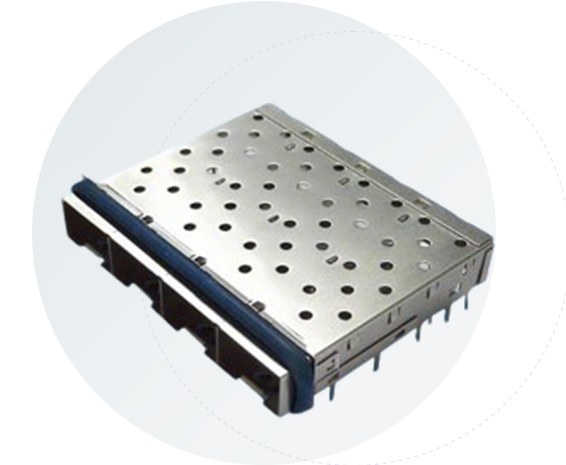


Selecting the appropriate SFP cage connector is crucial for ensuring optimal network performance and reliability. Here are some important factors to consider:
| Factor / Consideration | What to Check / Why It Matters | GLGNET Relevance |
|---|---|---|
| Data Rate Support | Verify the SFP cage & connector support the required data rate for your application. | GLGNET SFP cages & connectors support data rates up to 1 Gbps Ethernet for high-speed links. |
| EMI Shielding | Good EMI control helps maintain signal integrity in noisy environments. | GLGNET offers cages with EMI gaskets / springs to ensure stable, low-noise performance. |
| Mounting & Installation | Mounting type must match your PCB design and assembly process. | GLGNET provides press-fit and other mounting options for secure, easy installation. |
| Physical / Mechanical Design | Cage form factor (single-port / multiport) should align with mechanical and layout constraints. | GLGNET supports multiple port configurations to fit different PCB layouts and chassis designs. |
| Customization & Flexibility | Custom features can help match thermal, optical, or mechanical needs in your system. | GLGNET offers custom heat sinks, light pipes, and mechanical tweaks for tailored solutions. |
| Compatibility with SFP Modules | Cage should accept a wide range of SFP transceivers to keep the design flexible. | GLGNET SFP cages are designed to work with various SFP module types and connector styles. |
Understanding the differences between SFP, SFP+, SFP28, and QSFP is essential for choosing the right networking equipment. Each module type, along with its corresponding cage, offers unique features tailored to specific applications and performance requirements.
| Feature | SFP | SFP + | SFP 28 | QSFP |
|---|---|---|---|---|
| Data Rate | Up to 1 Gbps | Up to 10 Gbps | Up to 25 Gbps | Up to 40 Gbps(QSFP), 100 Gbps(QSFP28) |
| Cases Typical Use | Gigabit Ethernet | 10 Gigabit Ethernet, FCoE | 25 Gigabit Ethernet | Data centers, HPC,telecom |
| Channels | 1 | 1 | 1 | 4 (QSFP), 4 (QSFP28) |
| Connector Size | Smaller, 20mm x13mm x56mm | Same as SFP, 20mm x 13mm x56mm | Same as SFP+, 20mm x 13mm x56mm | Larger, 18.35mm x6.2mm x 72.4mm |
| Number of Pins | 20 | 20 | 20 | 38 |
| Compatibility | Wide range | Backward with SFP | Backward with SFP+ | Break-out cables for backward compatibility |
| Form Factor | Small, highdensity | Small, high density | Small, high density | Larger, high density |
| Advanced Features | Basic features | Improved performance | Higher data rates | Multiple data channels, high bandwidth |
1.What is an SFP Cage Connector?
An SFP cage connector is a metal enclosure mounted on a printed circuit board (PCB) in networking equipment such as switches, routers, and network interface cards. It serves as the mechanical housing and interface that allows a hot-swappable SFP optical transceiver module to be securely inserted and connected to the device.
The SFP cage performs several critical functions.
1.It provides mechanical support, holding the SFP module firmly in place while ensuring proper alignment with the device’s front panel and optical ports.
2.Its metal structure acts as EMI shielding, preventing electromagnetic interference that could disrupt high-speed signal transmission.
3.The cage forms part of the thermal path, helping transfer heat from the transceiver module to the surrounding chassis or heatsink.
In addition, the SFP cage works together with an electrical connector on the PCB to create the data interface between the transceiver and the host system. This enables the module to transmit and receive high-speed signals used in fiber optic or copper Ethernet connections. SFP cage connectors are commonly designed for different module standards, including SFP (1G), SFP+ (10G), and SFP28 (25G). They may also come in single-port, ganged, or stacked configurations to support high-density networking hardware.
Because they support hot-pluggable transceivers, SFP cage connectors allow network operators to upgrade or replace modules without shutting down equipment, making them a fundamental component in modern data centers and enterprise network infrastructure.
2.What are the benefits of using GLGNET SFP Cage Connectors?
3.What SFP transceivers are compatible with GLGNET SFP Cage Connectors?
4.Can I customize GLGNET SFP Cages for my specific needs?
5.Are GLGNET SFP Cage Connectors compliant with industry standards?
6.How do I install an SFP Cage Connector?
Installing an SFP transceiver in an SFP cage connector is a straightforward process. In most cases, you simply insert the module into the cage until it clicks into place, secure the latch, and then connect the fiber or copper cable. Proper installation ensures stable electrical contact and reliable data transmission.
Step-by-Step Installation
Step 1 – Power off the device
Before installing the module, power off the switch, router, or network interface card to avoid potential electrical damage.
Step 2 – Locate the SFP cage port
Identify the empty SFP cage connector on the device and remove the protective dust cover from the port.
Step 3 – Check the module orientation
Hold the SFP module so that the label faces upward or matches the orientation indicated by the cage design or bail latch.
Step 4 – Insert the SFP module
Gently slide the module into the SFP cage connector until it clicks into place. Do not force the module, as incorrect orientation can damage the connector.
Step 5 – Secure the latch
Ensure the bail latch or locking mechanism is closed to keep the module firmly seated in the cage.
Step 6 – Connect the cable
Remove the dust cap from the module and connect the appropriate fiber optic or copper cable.
Step 7 – Verify the connection
Power on the device and check the port LED indicator or management interface to confirm the link is active.
7.Can SFP cage connectors be used in both copper and fiber optic networks?


We use cookies and other tracking technologies online. Please read our Cookie Policy, which is part of this Cookie Policy , and is incorporated herein by reference.


